

Why I shut down my Lending Club bot
Back, in 2013, I wrote on article about building a Lending Club bot. At the time, I was just getting into investing and learning about different types of investments.
It sounded promising in theory. Lending Club was a platform that allowed for peer to peer lending and removed the typical banking middle man. A borrower would go on the site and request a loan for potentially 10s of thousands of dollars for various purposes: weddings, debt consolidation, vacation, starting a business, etc. An investor could choose to fund these loans with an interest rate based on the user’s credit history and job.
I was intrigued by this and am a person who is often eager to invest in new things so I began doing more research into it.
I did some historical backtesting on the different types of notes on Lending Club and discovered that the loans used for debt consolidation were the best performing. Then, because I’m lazy and didn’t want to manually pick the loans all the time, I built a bot that would automatically invest in the desirable loans for me whenever they got posted.
Initially, the loans seemed like they were performing fairly well, the annualized returns were generally in excess of 10%. However, as time passed and more defaults started rolling in, the return dropped.
About 1.5 years ago, I decided to stop re-investing any money into notes and I have now gotten back all the money I lent out plus interest.
Final Returns
After years of running the bot, and investing in over 7,000 loans, my annualized return was 7.17%.
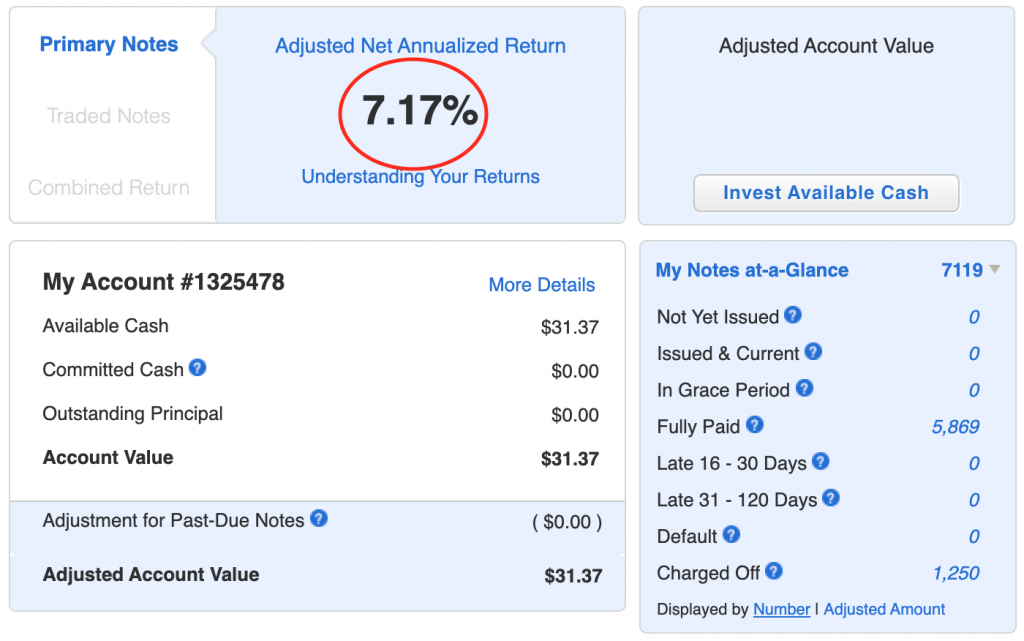
While this may seem initially like a good return, when you adjust for the risk and poor tax status, I [...]



Recent Comments